Days To | Countdown
- 4.7
- Rating
- 1.00M
- Installs
- Free
- Price

 Analysis by App-foxy
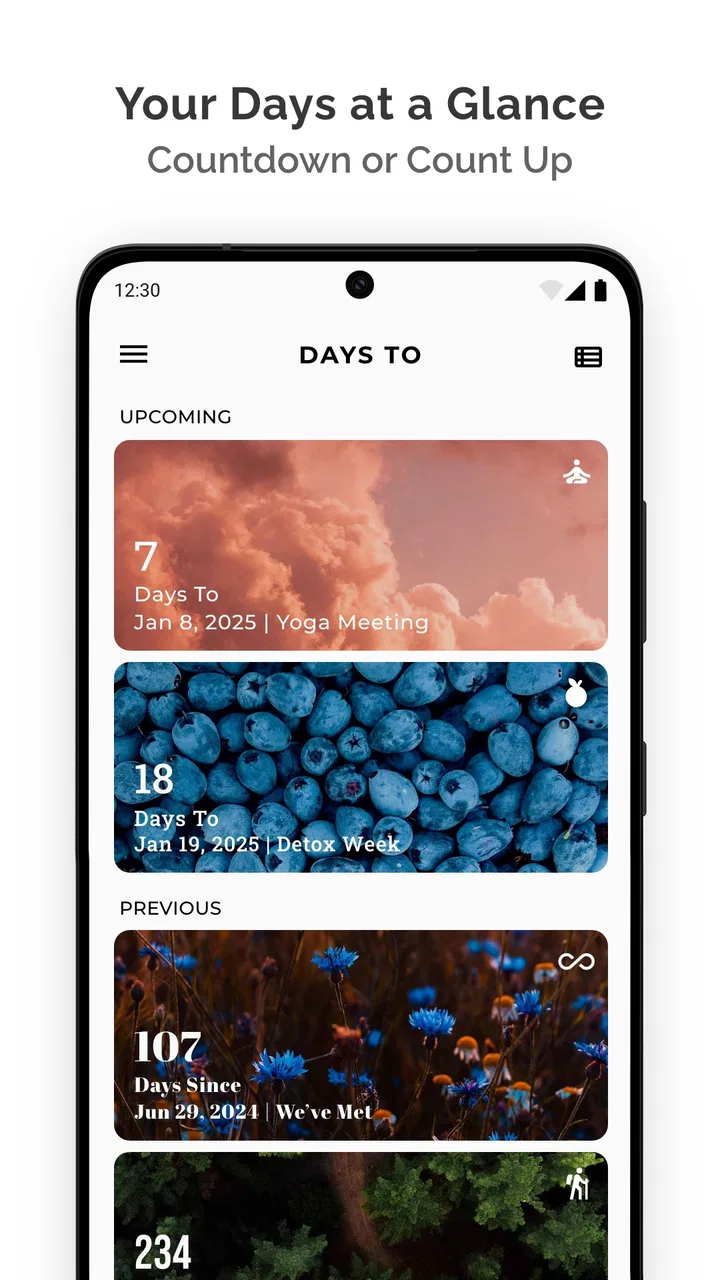
Days To appealed to me immediately because it solves a small but surprisingly common problem: remembering the dates that matter without forcing them into a full calendar system. It is a free lifestyle app from miniminiapps, built around countdowns for upcoming events. That sounds simple, and it is, but simplicity is exactly what makes it useful when I want a quick visual reminder rather than another complicated planning tool.
After using it, my main question was not whether it works. It does. The more interesting question is whether a countdown app earns a permanent place on a phone once the initial novelty wears off. My answer is cautiously positive. It can become a dependable little habit for birthdays, trips, appointments, anniversaries, exams, renewals, and personal goals, provided I keep the list tidy. If I let every minor event accumulate, the app becomes less meaningful and the countdowns lose their impact.
From first-week excitement to a useful daily habit
The first week is the easiest part to enjoy. I can add an important date, give it a clear identity, and immediately see the remaining time. That visual approach feels more motivating than opening a calendar, searching through a month, and interpreting a small entry. A countdown turns an abstract date into something I notice at a glance.
You May Also Like

 Blood Strike: 2.5 Anniversary
Blood Strike’s Loadouts Turn Every Drop Into a Tactical Gamble
A close look at Blood Strike’s custom loadouts: how fast access to signature weapons reshapes its battle royale rhythm, rewards preparation, and narrows the gap between fights.

 Pandora - Music & Podcasts
Pandora’s Music Is Easy to Start, but Harder to Recover
Pandora’s strength is its low-effort path from a seed to a station. Its weak spot is how much confidence it asks you to place in connection, setup, and quiet recovery.

 8 Ball Pool
 Is Built on Rivalries, Rematches, and Routine
A close look at the rivalries, rematches, shared routines, and unanswered safety questions that turn a quick pool match into a persistent mobile community.

 Samsung Music
’s Quiet Strength Is Playing What You Already Own
Its reach comes less from spectacle than from dependable access to a personal library. That simplicity is both the app’s strongest retention engine and its ceiling.

 AccuWeather: Weather Radar
AccuWeather Review: A Quick, Clear Forecast for Everyday Decisions
For everyday plans, the best forecast is the one you can understand quickly. AccuWeather makes rain timing, radar, and local conditions easy to act on, with a few trade-offs.

 Hill Climb Racing
Why Hill Climb Racing Still Turns Crashes Into One More Run
A tiny car, a bumpy hill and one more upgrade: Hill Climb Racing keeps resurfacing because its simple chaos makes every near-miss feel personal.
More From Our News Desk



I found the app especially pleasant for events that benefit from anticipation. A holiday, concert, wedding, vacation, or family celebration feels more present when the remaining time is displayed directly. The same applies to less cheerful but practical events, such as an insurance renewal or an application deadline. Instead of relying on memory, I can keep the date visible and let the passage of time do the reminding.
The free price lowers the barrier to trying it. Days To is rated for Everyone, so it is approachable for a broad audience, including people who do not want a specialized productivity system. Its average rating of 4.7 from around 28 thousand ratings also suggests that the straightforward idea connects with many users. I would not treat a rating as proof that it suits everyone, but it does match my experience: the basic purpose is easy to understand within minutes.
A realistic everyday use case is planning a family trip. I might create one countdown for the departure date, another for a relative’s birthday during the same season, and a third for a practical deadline such as renewing travel documents. The app does not replace the detailed itinerary or the calendar reminders, but it gives me a quick emotional and practical overview. When I open it, I see what is approaching instead of having to reconstruct the timeline from separate apps.
That distinction matters. A calendar is better when I need appointments, times, locations, recurring schedules, invitations, or detailed notes. Days To is better when the central question is simply, “How long until this happens?” I see it as a companion to a calendar rather than a replacement for one. Trying to make it handle every planning task would create unnecessary friction.
Why the visual countdown works
Countdowns are more memorable than isolated dates because they create a sense of movement. “June 18” requires me to calculate how close the event is. “A few weeks away” gives me an immediate feeling for urgency. That is useful for preparation, but it can also help with motivation. A personal target feels more concrete when I can watch the remaining time change.
One practical tip is to reserve the app for dates that deserve attention. I would not add every appointment or casual plan. If the list contains too many low-value entries, the genuinely important countdowns become harder to notice. The strongest setup is selective: a handful of events that I want to remember, prepare for, or look forward to.
Another useful approach is to give each event a name that explains why it matters. A vague label such as “Deadline” is less helpful than “Submit course application” or “Renew passport.” The countdown tells me when, while the title tells me what action or feeling is attached to the date. This small naming habit makes the app more useful without adding complexity.
What remains valuable after the novelty fades
Month to month, the app’s value depends on whether my dates are genuinely recurring parts of life. For birthdays and anniversaries, it can become a lightweight memory aid. For annual renewals, it can act as an early-warning display. For long-term plans, it can provide a visible sense of progress that a standard calendar entry often lacks.
I like that this kind of tool does not demand a large workflow. I do not need to reorganize my entire schedule to benefit from it. I can check it briefly, update an event when circumstances change, and move on. That low time requirement is important because many productivity apps lose their appeal by asking users to maintain elaborate systems.
The app has reached over a million installs, and that scale makes sense to me: the use case is broad, but the learning curve is small. I could recommend it to someone who wants a date-focused reminder without learning a project-management application. It is also suitable for people who enjoy visual motivation, such as counting down to a move, a new job, a personal celebration, or a planned purchase.
Still, recurring value is not automatic. A countdown is most effective when I check it at the right moments. If I never open the app and it does not fit naturally into my routine, it may become decorative rather than useful. I get the best results by checking it during a weekly planning moment, then removing or updating events that no longer matter.
That weekly review is one of my strongest recommendations. It takes very little time, but it prevents the list from becoming a graveyard of past plans. I can remove completed events, correct dates, and decide whether an upcoming item still deserves space. The app is simple enough that this maintenance does not feel like administrative work, as long as I do not postpone it for months.
Where it fits beside familiar alternatives
Compared with a phone calendar, Days To feels more focused and more emotionally direct. A calendar gives me context and scheduling power, while a countdown gives me visibility. If I need an alert at a particular hour, a calendar or reminder app is the safer choice. If I want to feel that a vacation is approaching each time I check my phone, a dedicated countdown has the advantage.
Compared with a notes app, Days To offers a clearer relationship with time. A note can store the date, but I have to interpret it myself. Compared with a habit tracker, it is less about daily repetition and more about reaching a specific moment. Compared with a full planning application, it is much lighter, but it also lacks the depth that complex projects require. Choosing it depends on whether the date itself is the main object.
I would also avoid using it as my only safety net for important deadlines. For anything with serious consequences, I prefer a calendar notification or a second reminder system. A countdown is excellent for awareness, but awareness is not always the same as an actionable alert. The app can help me remember that something is coming; another tool may still be needed to tell me exactly when to act.
The maintenance burden is small, but real
The main upkeep is keeping the event list accurate. Dates can change, plans can be canceled, and annual occasions can require a new entry or an update. That is not a serious burden, but it is the difference between a useful dashboard and a cluttered one. I would rather maintain five meaningful countdowns than keep twenty entries that I rarely inspect.
There is also a psychological maintenance issue. Some countdowns create excitement, while others create pressure. A visible deadline can encourage preparation, but seeing it every day may become stressful if I am already anxious about the task. In those cases, I would use the app selectively and pair the date with a concrete plan elsewhere. The countdown should support action, not become a constant source of worry.
People often ask whether a simple date app can replace reminders. In my experience, it should not be treated as a complete replacement. It is best for persistent awareness and anticipation. For a meeting tomorrow morning, a timed notification is more dependable. For a trip several weeks away, a countdown may be more satisfying and easier to absorb.
Another practical question is whether it suits shared planning. I would not choose it as the main coordination tool for a household or team because a countdown alone does not communicate responsibilities, changes, or detailed logistics. It can show that an event is approaching, but everyone involved may still need a shared calendar, messages, or task list.
The current version is 6.1.1, and the app supports Android devices running version 8.0 or later. That makes it accessible to many people using older phones, although anyone on an earlier system would need to check compatibility before planning around it. The presence of optional in-app purchases, ranging from $1.99 to $9.99 per item, is worth knowing for users who want to keep spending strictly at zero. The core appeal remains its free entry point, but I would review any purchase screen carefully before confirming an upgrade.
Where fatigue can set in
The biggest source of fatigue is repetition. At first, watching a number decrease feels satisfying. After a while, the same countdown can become background decoration, especially for events that are far away. If I add too many long-term goals, the screen may stop feeling informative and start feeling like a static list.
A second problem is emotional imbalance. Countdown apps naturally highlight future moments, but not every future moment deserves daily attention. A user who adds every bill, obligation, appointment, and deadline may end up with a constant reminder of pending tasks. I think the app works better when I balance practical dates with positive ones, such as celebrations or trips, or when I keep only the deadlines that truly benefit from a visible lead time.
There is also a trade-off between simplicity and detail. The app’s focused concept is its strength, but users who want extensive notes, dependencies, recurring task logic, collaboration, or time-blocking will probably outgrow it. That is not a flaw in the basic idea; it is a boundary. I would skip it if I already rely on a robust planning system and do not want another place to update dates.
Someone might also wonder whether it is worth installing when a phone already has a calendar. My answer depends on behavior. If I regularly open the calendar and notice upcoming events, I may not need a separate countdown. If dates disappear inside a busy schedule and I respond better to a visual “time remaining” format, Days To can earn its place. The value comes from how I process time, not from having more apps by itself.
Who will get the most from it
I think Days To is a strong fit for people who enjoy anticipation, need a simple view of several important dates, or want a gentle prompt for long-range preparation. Students can use it for major submission dates, travelers for departures, families for celebrations, and anyone managing annual renewals for events that are easy to forget.
It is also useful for people who dislike complicated productivity systems. There is no need to build categories, projects, or elaborate routines just to see what is approaching. That restraint is refreshing. The app gives a date a visible place and leaves the rest of the planning to me.
I would recommend skipping it if I needed detailed scheduling, collaborative planning, reliable time-specific alarms, or a complete task manager. I would also skip it if I know I will add dozens of events and never review them. In that situation, a countdown view may create the appearance of organization without helping me take action.
For users concerned about age suitability, the Everyone rating makes the app broadly approachable. Even so, the best setup still depends on personal judgement: a child may enjoy counting down to a birthday, while an adult may use it for deadlines or recurring responsibilities. The concept is flexible, but the usefulness comes from choosing appropriate events rather than filling the screen automatically.
My long-term verdict
After the first-week novelty fades, Days To remains worthwhile when I treat it as a focused date dashboard instead of a universal organizer. Its lasting strength is the ability to make selected future moments visible without demanding a complicated system. That is a modest feature set, but it addresses a real gap between a plain calendar and an overly detailed productivity app.
My best long-term workflow is simple: add only meaningful dates, name them clearly, check the list once a week, and remove anything that no longer deserves attention. I would use a separate calendar for timed alerts and detailed logistics, then let the countdown app handle anticipation and broad awareness. This division keeps each tool doing what it does best.
The free model makes experimentation easy, while optional purchases between $1.99 and $9.99 per item mean I would stay alert to any extras I do not need. The app’s strong average rating and large install base are encouraging, but my recommendation is based more on its practical fit than on popularity. It is a small tool, and small tools are valuable only when they match a real habit.
My final view is that Days To earns lasting space for selective users. I would keep it installed for birthdays, trips, annual obligations, and a few meaningful goals. I would not use it as my calendar, task manager, or sole reminder system. If you want a clean way to see how close important events are, it is an easy app to recommend. If you need detailed planning or constant automation, your existing calendar will probably serve you better.
FAQs for Days To | Countdown
01What is Days To | Countdown used for?
Days To | Countdown is designed to help you track the time remaining until important events, deadlines, holidays, trips, birthdays, anniversaries, and other personal occasions. After creating an event, the app displays a countdown showing the remaining days, and in some cases a more detailed time calculation. It is useful for keeping upcoming plans visible and adding a little anticipation to special dates.
02How do I create and customize a countdown in Days To | Countdown?
Creating a countdown is generally straightforward: add a new event, enter its name, select the target date, and save it. Depending on the version and device, you may also be able to choose a background, color, icon, or other display options. These customization tools make it easier to distinguish several countdowns, such as a vacation, an exam, a wedding, or a payment deadline.
03Can I use Days To | Countdown for recurring events?
The app may support recurring dates or allow you to recreate an event when it happens again, but the exact options can vary between Android and iOS versions and may change after updates. Before relying on it for birthdays, anniversaries, subscriptions, or annual holidays, check the event settings carefully. If recurrence is limited, you may need to update or duplicate the countdown manually.
04Does Days To | Countdown require an internet connection?
A countdown application normally performs its basic date calculations directly on your device, so creating and viewing saved events should generally work without a continuous internet connection. Internet access may still be needed for downloading the app, receiving updates, displaying advertisements, syncing data, or using optional online features. If your countdowns are important, test the app offline and confirm that your events remain available.
05Is Days To | Countdown free to download, and are there in-app purchases?
The availability and cost of Days To | Countdown can depend on the platform, region, and current store listing. Some versions may be free with advertising, while additional customization, ad removal, widgets, or premium tools could require an in-app purchase or subscription. Review the Google Play or App Store information before downloading, especially if you want a completely ad-free experience or access to every feature.
Pros
- Clean
- easy-to-read countdown display
- Supports tracking multiple upcoming events
- Useful for birthdays
- trips
- holidays
- and personal milestones
- Quick event creation with minimal setup
- Helps make important dates easier to remember
Cons
- Some features may be limited without a premium upgrade
- Notifications can be missed if background activity is restricted
- Limited customization compared with advanced planner apps
- Countdowns may need manual updates for recurring events
- Privacy details should be checked before adding sensitive event information

Days To | Countdown
Gallery